Processes
A process runs through one or more phases where each phase consists of multiple activities with tasks to be completed. For each activity, you can define tasks that have to be completed by the project team. A process consists of phases, which are implicitly followed by gates. Thus, a process is an alternation of phases and gates.
If licensed, you can create multiple processes.
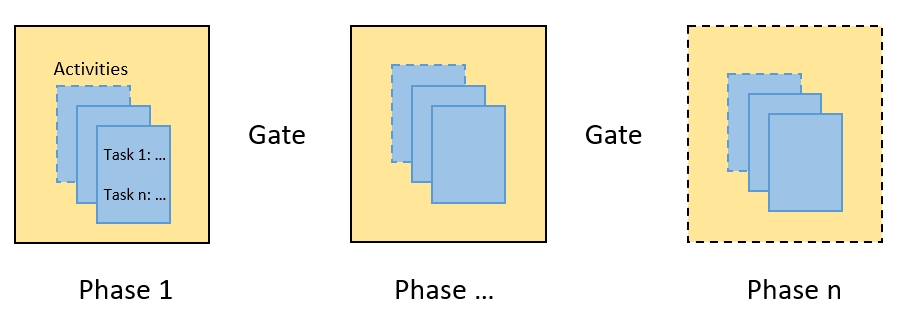
Phases
Name - Enter a name that indicates the main activity of the phase.
Description and Goal - For each phase you describe the goal.
Gatekeeper Definition - Here you explain what the gatekeepers of a phase have to do, so the latter project leaders can assign the right persons.
 Best Practices
How to describe the gatekeeper's skills? Tell the project leader which skills and experiences are needed to decide whether the activities and tasks of this phase have been completed and whether the project can move forward. For example, which org unit or department has the most knowledge and can assess the results.
Activities and tasks
Activities are units to be elaborated during a phase. Name the activities in a way that clearly indicates what kind of information you are requesting.
Best Practices
How to name activities and tasks? Name the activity as top level procedure title, with related tasks grouped below. For example, "Preparing the Market Plan" activity with tasks "Describe Buyers Mix", ...
Define the tasks - For each phase you can define any number of tasks. Tasks are represented by fields where the responsible person can fill in the requested details. You can use fields of the following types:
- Text
- Number field
- Keyword (single selection)
- Keyword (multi selection)
- Attachment field
Tasks (fields) that are used in multiple process phases can be marked as "shared tasks" fields. Shared tasks appear in a separate list an can be used across processes and phases. The list displays all other processes and phases, where a task is used.
Selected tasks (fields) can be displayed on the project dashboard on the project summary.
Attachment Fields
Users can upload images (PNG, JPG, GIF), PDF files, and MS Office documents (DOCX, PPTX, XLSX, DOC, PPT, XLS). Documents with macros are not allowed.
Multiple Processes
Working with multiple processes has to be licensed. Processes can be enabled or disabled. If you disable a process that has already been used for projects, you can still work on these projects. However, you cannot create new projects based on the process.
Reporting - In the portfolio analyzer, you can select the process to be analyzed.