Roles and Rights
Note: We call a mutually connected system of HYPE Enterprise platform (Ideation, Strategy, Partnering) and HYPE Projects a "paired system".
HYPE Projects: Global and Project Roles
A global role is a component-wide role. Project roles can be defined on the level of each project. When you work in a paired system, some roles have to be set on both sides (platform and projects).
HYPE Enterprise Platform Roles
Campaign and channel managers can create projects out of ideas. Members of the user group IO Project Creator, who also hold the role of a portfolio manager, can create projects that are not linked to ideas via the main menu.
HYPE Enterprise User Groups
Note that external users (self-registered users, members of the user group External) cannot access projects.
Roles in HYPE Projects
 Process Designer
See also Process Design.
- Global role (HYPE Projects.
- Defines the project process(es).
- Can see the “Process” menu and edit the process (including phases, status, activities, ...).
 Portfolio Manager
See also Projects Introduction.
- Global role (HYPE Projects). There is one or more portfolio manager per tenant (tenant settings).
- Can see all draft projects.
- Can delete draft projects.
- Can create projects.
- Can change the project phase and status.
- Can edit all fields in draft projects.
- Can edit the project summary in running projects.
- Can read the project activities and tasks.
- Assigns the project leader and the project team.
 Project Leader
- Can read Project Summary, Activities and Tasks, and Completed Phases in all running projects.
- Can edit the Project Summary and the activities in their running projects.
- Can assign team members to tasks.
- Can set activities in their projects to public.
- Can set their projects to confidential.
- Assigns the gatekeeper(s).
- Can move the project forward.
Project Team Member
- Can read and edit the Activities and Tasks in running project.
- Can assign team members to tasks.
- Can read Completed Phases.
 Gatekeeper
- For each phase, the project leader assigns appropriate gatekeepers.
- Decides about progress: Next phase, rework, postpone, archive ...
 Tenant Admin
- Global role
- Can delete projects that have been started.
- Can change the project phase and status.
- No more rights on projects.
- Can assign roles to users.
 All users
- Can read Project Summary in running projects.
- Can read public activities.
- Cannot read confidential projects.
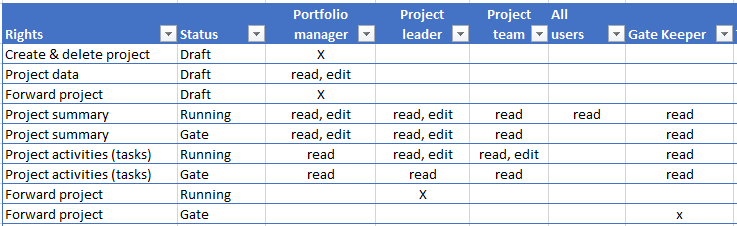
Rights and Roles per Project Status
Draft
- Portfolio managers can see all draft projects.
- Portfolio managers can delete draft projects.
- Portfolio managers can edit all tasks (fields).
Running (Elaboration)
Project is in one of the defined process phases.
- All users can read the project details > Project Summary
- Portfolio managers, the project leader and the project team can read the Activities and Tasks.
- Portfolio managers and project leader can edit the Project Summary: Title, Description, Team, ...
- Project leader and project team can edit the Activities and Tasks.
- Project leader can forward the project.
Gate (Evaluation)
Project phase is in decision.
- Portfolio managers can
- read and edit the summary.
- read the activities and tasks.
- Project leaders can
- read and edit the summary.
- read the activities and tasks.
- Gatekeeper can forward the project.